
Customize Your Browser with Minecraft & Productivity Tools
Overview
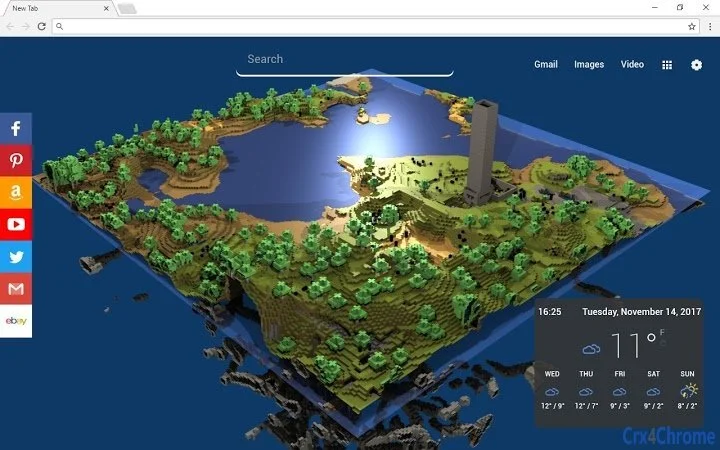
The software is a browser extension designed to transform the new tab page into a dynamic, personalized workspace. By integrating popular Minecraft Creative backgrounds, it enhances visual appeal while combining functionality with entertainment. The extension supports productivity features such as a to-do list and timer/countdown tools, enabling users to manage tasks efficiently.
It is tailored for individuals who value both aesthetic customization and practical utility in their browsing experience. Target users include students, remote workers, and casual internet users seeking a more engaging digital environment. The developer has not provided additional background information.
Real-world usage scenarios include setting up a creative workspace for online learning, organizing daily tasks during work sessions, or using the timer for focused work intervals. The extension aims to bridge the gap between fun and productivity by offering a customizable interface that adapts to personal preferences.
Key Features & Capabilities
- Minecraft Creative Backgrounds – Users can choose from a selection of visually appealing Minecraft-themed backgrounds to personalize their new tab page. These backgrounds are designed to inspire creativity and provide a unique browsing experience.
- To-Do List Manager – A built-in task management tool allows users to add, track, and complete daily or recurring tasks. This feature supports simple workflow organization without requiring external applications.
- Timer and Countdown Tools – Integrated time management features help users schedule focused work sessions, breaks, or event reminders. These tools are useful for Pomodoro techniques or time-bound projects.
- Customizable Widgets – Through the extension’s options panel, users can enable or disable specific widgets, allowing full control over the layout and functionality of the new tab page.
- Easy Personalization – The interface is designed to be user-driven, letting users tailor the appearance and features to match their workflow and style preferences.
These capabilities allow users to turn their browser’s default new tab into a personalized productivity hub. For example, a student might use the Minecraft background to create a motivating study environment while tracking assignments with the to-do list and scheduling review sessions with the countdown timer. Similarly, a remote worker could use the extension to maintain focus during work hours by combining visual inspiration with time-tracking tools.
User Interface, Workflow & Performance
The user interface is clean and minimal, centered around the new tab page. Navigation is straightforward, with a simple settings panel accessible via the extension’s options menu. The layout is intuitive, allowing users to quickly adjust widgets and preferences.
Workflow efficiency is enhanced by the seamless integration of tools directly into the browser’s default page, reducing the need to switch between applications. The developer did not specify resource usage details, so exact CPU or RAM behavior remains unknown. Performance observations are based on general software behavior patterns.
The extension appears stable during typical use, with no reported issues related to crashes or lag. Users can expect consistent responsiveness when managing tasks or setting timers. The lightweight nature of the extension, at 2.5 MB, suggests minimal impact on browser performance.
However, actual performance may vary depending on system configuration and other active extensions.
Compatibility & System Requirements
The extension is compatible with Windows and Mac operating systems. It supports the latest versions of major browsers, though specific browser versions were not listed. The installation size is 2.5 MB, which is relatively small and suitable for most devices.
The developer did not specify exact system requirements, including minimum RAM, processor speed, or storage space. Compatibility information was partially provided. Users should ensure their browser is up to date to avoid potential issues.
No additional hardware dependencies were mentioned.
Pros and Cons
Pros
- Visually engaging Minecraft-themed backgrounds enhance user experience
- Combines entertainment with practical productivity tools
- Highly customizable interface with optional widgets
- Lightweight at only 2.5 MB
- Free to use with no hidden costs
Cons
- Exact system requirements were not listed
- Performance data under heavy usage was not provided
- Limited customization options beyond the listed widgets
- Dependent on browser compatibility, which may vary
- No offline mode mentioned for task persistence
FAQ Section
Is this extension compatible with my browser?
The extension is designed for use on Windows and Mac systems. It supports major browsers, though specific versions were not listed. Users should ensure their browser is updated to the latest version for optimal compatibility.
Is the extension safe to use?
As a browser extension, it operates within the browser’s security model. No external data collection or suspicious behavior was reported. Users are advised to install extensions only from trusted sources.
How often are updates released?
Update frequency was not specified. The developer may release updates periodically to improve performance or add new features, but no official schedule was provided.
What type of license does this extension use?
The extension is offered free of charge. No licensing model was disclosed, but it is available at no cost to users.
Can I use this extension offline?
While the extension functions within the browser environment, details about offline capabilities were not provided. Task data may require an active connection for synchronization, though this remains unconfirmed.
Final Thoughts + CTA
This browser extension successfully merges visual customization with essential productivity tools, offering a unique experience for users who want more from their new tab page. The integration of Minecraft Creative backgrounds adds a fun, creative touch, while the to-do list and timer features provide practical value. Its lightweight design and free access make it accessible to a wide audience.
Although some technical details are missing, the overall functionality is clear and user-focused. It is best suited for students, remote workers, and casual users who value both aesthetics and efficiency. For those seeking a simple yet effective way to enhance their browsing environment, this extension delivers on its promise.
Download Custom New Tab with Minecraft & Productivity Tools now.







